Looking for best free google AI tools to boost your productivity? In today’s fast-paced world, an AI agent isn’t just a luxury for tech giants; it is something everyone can use to work smarter. To stay ahead of the curve, it’s also essential to understand the broader tech trends 2026 that are shaping how these Google tools evolve. Whether you are a student, a small business owner, or a creative, these Google tools allow you to automate the boring stuff and focus on what matters.
Google has moved far beyond simple search. With the integration of Gemini in Google services, we now have access to some of the most advanced AI models in the world for zero cost. This guide covers the top free AI apps by Google and AI-powered tools from Google that require absolutely no coding skills.
In this guide, you’ll get:
- A detailed breakdown of the 7 best free tools.
- Simple, step-by-step instructions for each.
- Tips on how to use an api key or app builders to customize your experience.
- A look at how AI assistants like Gemini Live are changing the game.
Ready to try Google AI tools for free today? Let’s dive in.
Quick Summary: Top 7 Free Google AI Tools (2026)
- Opal AI: Best for building functional apps using plain English.
- NotebookLM: Best for students to turn research notes into AI-led videos.
- Google AI Studio (Build): Best for professional “vibe coding” and app prototyping.
- Gemini Canvas: Best for turning messy text into professional slide decks.
- YouTube AI Summaries: Best for saving time by summarizing long videos instantly.
- Pomelli: Best for small businesses to automate social media brand design.
- Text-to-Speech (AI Studio): Best for creating human-realistic voiceovers for free.
Why Use Free Google AI Tools?
Free Google AI tools are changing the way we handle information. By using Google machine learning tools, you can automate tasks that used to take hours. Imagine finishing a week’s worth of reports, social media designs, or video summaries in just a few minutes.
The Power of Google Clouds and AI Models
Most of these tools run on Google Cloud, meaning you don’t need a powerful computer to use them. Whether you are using the lightweight nano banana (Google’s Gemini Nano) on your phone or a heavy-duty model in the Google app, the processing happens in the cloud.
Key benefits include:
- Save Time: An AI agent can do the heavy lifting, like building a functional app in seconds.
- Boost Creativity: Use a music AI or image generator to spark fresh ideas for your projects.
- Improve Workflow: AI assistants fix daily pains, such as messy meeting notes or unorganized presentations.
- Access for All: These are excellent AI tools for business, developers, and researchers alike.
If you need free AI tools to improve workflow, Google’s ecosystem is the most connected. You can start a conversation in an AI chat, move it to a document, and turn it into an app, all using Google models.
1. Opal AI: Build Apps with Plain English
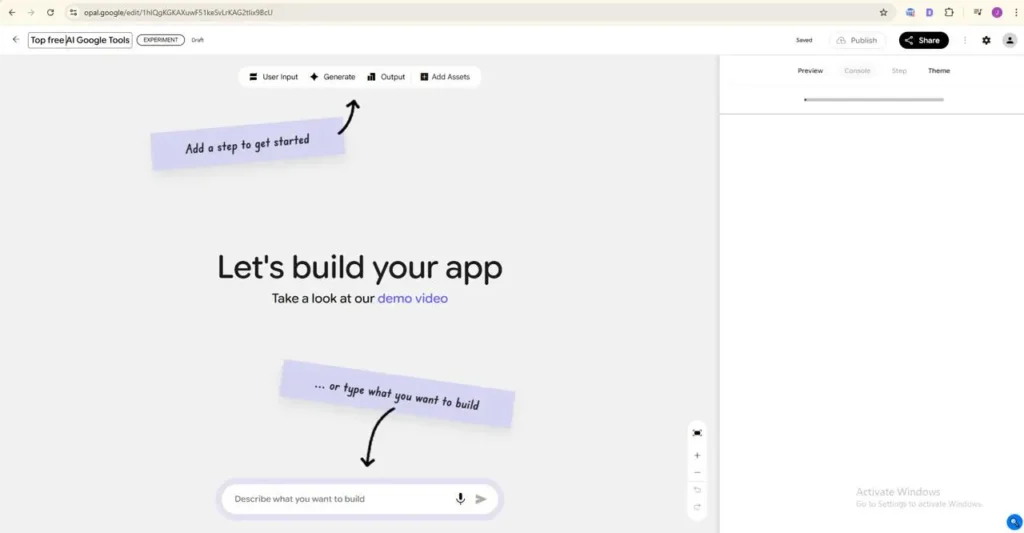
If you have ever had a great idea but felt held back because you aren’t a programmer, Opal is your new best friend. Found at opal.google, this is one of the most impressive app builders ever released. It allows you to build functional applications using nothing but plain English.
How an AI Agent Builds Your App
Opal acts as a bridge between your ideas and the google clouds infrastructure. You don’t write code; you describe a “vibe” and a function. Before building your app in Opal, make sure your idea is solid. Check out how to validate a startup idea in 48 hours.
How it works:
- Enter the Portal: Go to the Opal home page and click “Create New.”
- Describe Your Vision: Use the text box at the bottom. For example: “Build a meal prepping app that lets me enter how many people are on the meal plan and any dietary restrictions.”
- The Generation Phase: Within about 20 seconds, the AI models behind Opal will build the logic.
- Review the Workflow:
- Yellow Blocks (User Inputs): These are where your users will type information.
- Blue Blocks (The Brain): This is where the Gemini in Google Logic processes the data.
- Publish: Once you are happy, you can generate a link and share your app with the world.
Availability: Opal is available in select countries. If you’re lucky enough to be in one, you can use it directly; otherwise, a reliable VPN works. After its U.S.-only launch in July 2025, Opal expanded to 15 more countries, including Canada, India, Japan, South Korea, Vietnam, Indonesia, Brazil, Singapore, Colombia, El Salvador, Costa Rica, Panama, Honduras, Argentina, and Pakistan.
2. Google AI Studio “Build” Feature
While Opal is for quick projects, the Build feature in Google AI Studio is for people who want to create professional-grade software. This is where AI assistants meet professional development.
Vibe Coding and API Keys
This tool introduces the concept of “vibe coding.” You describe the “vibe” of the software, and Google writes the professional code. If you are a developer, you can even grab an api key here to connect these Google models to your own existing website.
How it works:
- Open Google AI Studio and select “Build.”
- Type a prompt like: “Create a scheduling app for remote teams that handles 5 different time zones.”
- The system generates “Yellow blocks” for inputs (team names) and “Blue blocks” for the smart logic.
- Customization: Unlike simpler tools, here you can adjust the “temperature” of the AI to make it more or less creative.
This is one of the most powerful top Google AI tools because it allows you to host your apps online for free using Google’s backend.
3. NotebookLM: Your Personal Research AI Assistant
NotebookLM has recently been updated to become a full-scale research powerhouse. It is no longer just a place to keep notes; it is now an AI assistant that can talk to you.
From Notes to AI Audio and Video
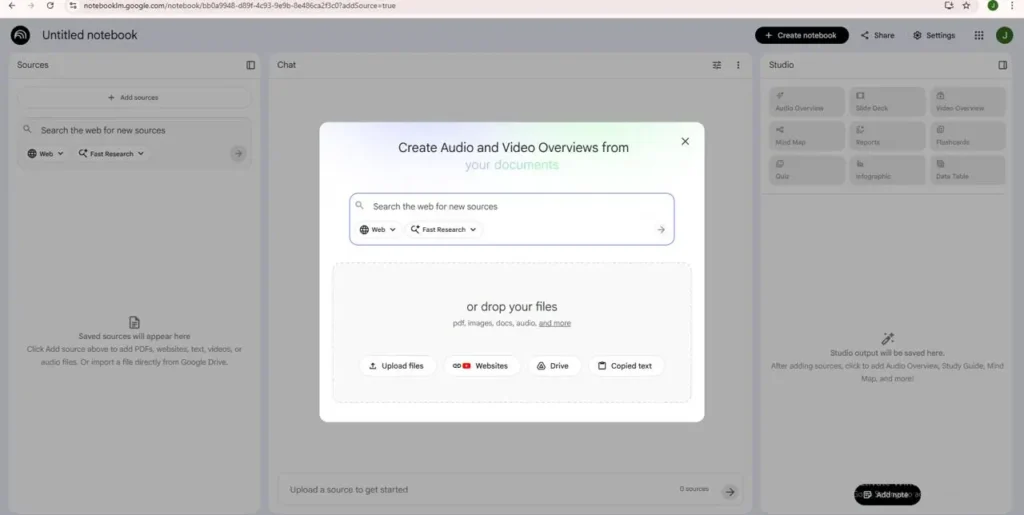
The standout feature of 2026 is the ability to turn dry research into a conversational video or audio file. It uses Google models to “read” your PDFs and transcripts, then creates a conversation between two AI hosts.
How it works:
- Upload: Drag your research papers or class notes into the notebook.
- Instruction: Tell the AI, “Focus on the most important dates and summarize the main conflict.”
- Generate: It creates an “Audio Overview” that sounds like a professional podcast.
This is the perfect free AI tool for students who are tired of reading hundreds of pages. You can listen to your “notes” while you are at the gym or driving.
Comparison of Top Free Google AI Tools (2026)
| Tool Name | Key AI Agent Task | Best For… | Top Free Feature | Access Link |
| Opal | Plain-English App Building | Beginners & Hobbyists | No-code app generation | opal.google |
| NotebookLM | Research & Summarization | Students & Academics | Notes-to-Video/Audio | notebooklm. google |
| AI Studio (Build) | Professional “Vibe Coding” | Developers & Tech Pros | Pro-level code & API Keys | aistudio. google |
| Pomelli | Automated Brand Design | Small Business Owners | Website-to-Social Graphics | pomelli. google |
| Gemini Canvas | Smart Doc/Slide Layouts | Content Creators | Instant Pro Presentations | gemini.google |
4. Gemini Canvas & Instructions
We have all struggled with making a boring Word document look like a professional presentation. Gemini Canvas solves this by acting as a built-in designer within the Gemini app.
Turning Chat into Content
When you are in a ai chat with Gemini, you can now open the “Canvas” mode. It takes your messy notes and instantly applies professional layouts and images.
Key Features:
- Custom Instructions: You can give Gemini “Permanent Rules.” For example, tell it to “Always be concise” or “Always sound like a friendly teacher.”
- Instant Slides: It uses AI models to decide where a picture should go and how to bullet-point your text for the best impact.
Whether it is for a work deck or a school project, this is one of the best free AI tools for productivity because it eliminates the “design” phase of your work.
5. YouTube AI Summaries
YouTube is the world’s largest library of information, but watching long videos is time-consuming. Google has now integrated gemini in google directly into the YouTube experience to save you time.
No More Wasted Clicks
Under many videos, you will now see a small AI-generated text box. This AI assistant watches the video for you and provides a summary.
Why is this free AI tool from Google listed on top?
- Pre-reading: See if the video actually has the answer you need before you watch the ads.
- Quick Links: The summary often includes timestamps, so you can jump straight to the “How-to” part.
- Learning: If you are using googles tools for research, this allows you to “scan” 20 videos in the time it usually takes to watch one.
6. Pomelli: The Instant Brand Designer
For small business owners, Pimelli is a “secret” tool that acts as a free marketing agency. It uses AI agent technology to study your website and create matching content. After designing your posts with Pomelli, you can turn your ideas into reality and learn how to start a business with $0.
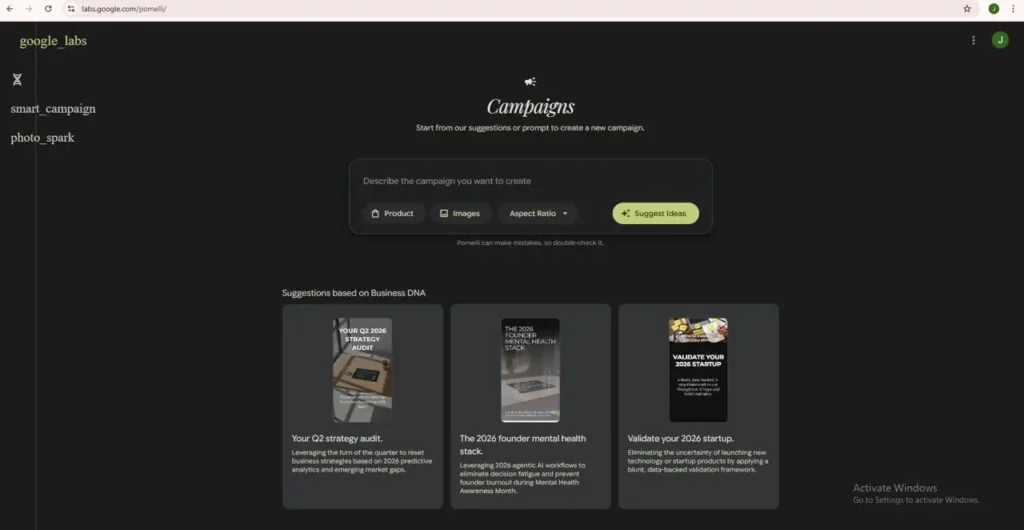
How this Feature Works:
- Scan: You give Pimelli your website URL.
- Learn: It uses Google machine learning tools to identify your brand colors, your favorite fonts, and your logo.
- Create: You can then say, “Make me five Instagram posts for a summer sale.”
- Result: It generates high-quality graphics that look like you hired a pro designer.
This is a massive boost for AI tools for business, allowing tiny companies to look as professional as giant corporations.
7. Google AI Studio Text-to-Speech
Bad audio ruins great content. Google AI Studio now offers a free Text-to-Speech tool that uses its most advanced Google models to create realistic human voices.
Beyond Basic Voices
It is not just the voice of Siri you listened to on iphone five years ago. This tool can handle:
- Multi-Character Scripts: Have two AI voices “talk” to each other in a podcast style.
- Emotional Inflection: The AI knows when to pause for breath or emphasize a word.
- Music AI Integration: You can even add background tracks to create a full audio experience.
For content creation and automation, this tool is a lifesaver. You can turn a blog post into an audio file or a voiceover for a YouTube video in seconds.
Want a bigger picture of what AI can do? Check out our guide on the best AI tools in 2026 to explore even more options beyond Google’s free offerings.
How to Choose the Right Free Google AI Tool
If you are just getting started with the Gemini app or Google app, it can be overwhelming. Here is how to pick:
- For Creativity: Start with Opal or Pimelli. They give you visual results immediately.
- For Study: NotebookLM is the clear winner for anyone dealing with lots of text.
- For Daily Speed: Use YouTube Summaries and the Gemini live feature for voice-based help while you’re on the go.
The best part about googles tools is that they all live under one roof. Your api key from AI Studio works with the same account you use for YouTube.
Tips to Maximize Free Google AI Tools
While Google offers an incredible ecosystem, there are many other industry-leading platforms worth exploring. Check out our comprehensive ranking of the best AI tools 2026 to see how Gemini compares to the latest releases from OpenAI and Anthropic
To truly get the most out of AI assistants, you should try “chaining” them together:
- Use NotebookLM to research a topic.
- Use Gemini Canvas to turn that research into a script.
- Use Text-to-Speech to create the audio for that script.
- Use Pimelli to design the thumbnail for the video.
By combining these free AI tools for content creation and automation, you can do the work of a 5-person team all by yourself.
Conclusion
The future isn’t about whether you use AI, but how you use it. From the nano banana models running on your phone to the massive Google Clouds powering Opal, these tools are available to everyone for free.
The best way to start is to pick one tool, perhaps Opal for a fun project or NotebookLM for your next research task, and see how much time it saves you. Once you see the power of an AI agent in action, you’ll never want to go back to the old way of working.
Frequently Asked Questions (FAQs)
Which Are the Top 5 AI Tools?
From the top 2026 lists, including topnewthings style rankings, here are the consensus top 5:
- ChatGPT (OpenAI) – Best for reasoning, coding, and general use with o3 models.
- Claude (Anthropic) – Top for code, analysis, and large contexts.
- Microsoft Copilot – Productivity king in Office/Teams.
- Google Gemini – Multimodal with huge context and Google ties.
- Perplexity – Real-time research and citations.
NotebookLM ranks high too, for docs/videos.
Which Google AI Tools Are Free?
Yes, Google offers many free AI tools in 2026. Top ones include Gemini (chatbot), NotebookLM (notes to videos), Google AI Studio (app builder), Colab (coding/ML), YouTube AI summaries, and Opal AI (plain English apps). These work with a free Google account—no payments needed for core features.
Is There a Free AI That You Can Ask Anything?
No AI lets you ask literally “anything” due to safety filters on harmful content. Gemini Live (free on mobile/web) comes closest, handles voice, images, and tough questions in 150+ languages. ChatGPT’s free tier does similar with GPT-4o. Both have polite limits.
Which AI Is Better Than ChatGPT?
Gemini often beats ChatGPT in 2026 tests for longer context, Google integrations (Docs, Search), and multimodal tasks like video analysis. ChatGPT wins on speed and plugins. Gemini suits Google users; ChatGPT for standalone power.
Is ChatGPT AI Free?
Yes, ChatGPT free uses GPT-4o for chats, images, and search—great for daily use, though peak times add wait limits. Paid Plus ($20/month) unlocks priority and extras.
How to Use AI on Google for Free?
- Go to gemini.google.com or download the Gemini app.
- Sign in with your Google account (free).
- Type or speak questions, use for writing, summaries, or apps via AI Studio.
- Try Opal at opal.google: Describe apps in English, hit submit.
What Is Google’s Version of ChatGPT?
Gemini – Google’s multimodal chatbot with real-time web search, Gmail/Docs ties, and free access. Like ChatGPT but baked into Google’s ecosystem.
Is Google Gemini AI Free?
Yes, base Gemini is fully free on web, app, and Android, includes voice mode, and student tools. Premium add-ons (like advanced video) cost extra.
Is Google’s New AI Better Than ChatGPT?
Gemini 3 Pro tops ChatGPT in benchmarks, multimodality, and integrations; excels at research. ChatGPT feels snappier for quick tasks. Pick Gemini if you live in Google Apps.
How Can I Get Google Gemini for Free?
Visit gemini.google.com, sign in for free with Google, or grab the app from the Play Store/App Store. Start chatting right away, no signup hassles. Devs get API keys via AI Studio.
Is there a Free AI for Music?
Yes, Google’s music AI experiments allow you to describe a song or a “vibe” and generate a melody. These are often found within the Google AI Experiments portal.